Trace coding agent sessions
Send your Claude Code or Codex activity to Lens. Your model login and model endpoint stay unchanged.
You need a running Lens installation and a dedicated Lens tracing key. If you are starting from scratch, follow the Lens deployment guide. Your existing Claude Code or Codex model login continues to work.
Open http://localhost:4318/ui/ for the local quickstart, or select Lens in your LiteLLM dashboard. Generate a tracing key and copy the full Traces endpoint, including /v1/traces. Ask your administrator if you cannot create a key. The examples use local Lens; replace the address with your endpoint and keep any /lens-ingest prefix. A tracing key uploads telemetry, not model requests. Keep it private.
Claude Code
Claude Code needs no Lens plugin or helper. Its built-in OpenTelemetry exporters send trace spans and assistant response logs directly to Lens. Model calls can continue through your Claude subscription or your existing API provider; leave your Claude login and model endpoint unchanged.
Copy this prompt into your coding agent to have it configure this machine, or follow the manual steps below.
Set up this machine to send my Claude Code sessions to LiteLLM Lens. First read https://docs.litellm.ai/docs/proxy/lens/coding-agents.md and https://docs.litellm.ai/docs/proxy/lens/deployment.md.
1. Ask me for the full Traces endpoint from Lens > Traces > Set up tracing and an agent name, defaulting to claude-code. Preserve any /lens-ingest prefix and include /v1/traces once. Derive the logs endpoint by replacing the final /v1/traces with /v1/logs. Read my dedicated tracing key from an existing environment variable or a hidden terminal prompt. Never ask me to paste the key into chat, print it, or commit it.
2. Check that tracing is enabled and the Lens service accepts Claude conversation logs at /v1/logs. If it needs an upgrade, explain that before changing my local settings.
3. Explain which session content will be sent to my Lens service. Configure Claude's built-in OTLP trace and log exporters and the content flags in the guide. Merge them into the env object in my user-level ~/.claude/settings.json, preserving other settings and resource attributes. Keep credentials in private user configuration. Use lens.session.capture=true and my chosen gen_ai.agent.name. Do not install a plugin or helper, change my Claude subscription/API login or model endpoint, or enable optional raw API-body export.
4. Tell me to restart Claude Code, then complete a small prompt that uses a tool. Verify the new trace under my chosen agent name in Lens > Traces > Conversation contains the prompt, tool activity, and assistant reply. These events belong in Lens, not the normal request Logs screen. Report any missing content or export error instead of claiming setup succeeded.
5. Show me the configuration changes with credentials hidden, explain how to pause telemetry, and point out the capture limits described in the guide.
Verified with Claude Code 2.1.328 and Lens 0.1.0. Keep CLAUDE_CODE_ENHANCED_TELEMETRY_BETA=1: the telemetry enable flag alone does not enable its beta trace exporter.
In the terminal where you run claude, paste the endpoint and tracing key in the first two lines, then run the block. The logs URL uses the same address with /v1/logs in place of /v1/traces:
export LENS_TRACING_KEY="<paste your Lens tracing key>"
export OTEL_EXPORTER_OTLP_TRACES_ENDPOINT="http://localhost:4318/v1/traces"
export OTEL_EXPORTER_OTLP_TRACES_HEADERS="Authorization=Bearer $LENS_TRACING_KEY"
export OTEL_EXPORTER_OTLP_LOGS_ENDPOINT="${OTEL_EXPORTER_OTLP_TRACES_ENDPOINT%/v1/traces}/v1/logs"
export OTEL_EXPORTER_OTLP_LOGS_HEADERS="Authorization=Bearer $LENS_TRACING_KEY"

export CLAUDE_CODE_ENABLE_TELEMETRY=1
export CLAUDE_CODE_ENHANCED_TELEMETRY_BETA=1
export OTEL_METRICS_INCLUDE_SESSION_ID=true
export OTEL_TRACES_EXPORTER=otlp
export OTEL_EXPORTER_OTLP_TRACES_PROTOCOL="http/protobuf"
export OTEL_METRICS_EXPORTER=none
export OTEL_LOGS_EXPORTER=otlp
export OTEL_EXPORTER_OTLP_LOGS_PROTOCOL="http/protobuf"
export OTEL_RESOURCE_ATTRIBUTES="lens.session.capture=true,gen_ai.agent.name=claude-code"

export OTEL_LOG_USER_PROMPTS=1
export OTEL_LOG_ASSISTANT_RESPONSES=1
export OTEL_LOG_TOOL_DETAILS=1
export OTEL_LOG_TOOL_CONTENT=1

claude -p "Reply with exactly: Lens telemetry check."
The content flags include prompts, assistant replies, tool arguments, and supported tool outputs, which can contain source code or secrets. Enable them only for a Lens deployment where you intend to store that content.
Open Traces in standalone Lens or Lens > Traces in LiteLLM. Filter by claude-code, open the session trace, and select Conversation to see the prompt and reply. Run claude without -p for interactive sessions. New turns in the same session update its trace.
lens.session.capture=true groups turns with the same Claude session ID into one trace, including resumed sessions and background-agent replies. Original trace IDs remain in span attributes. Omit this resource attribute to retain Claude's separate traces per interaction. If you already set OTEL_RESOURCE_ATTRIBUTES, append these values instead of replacing your existing attributes.
Do not set OTEL_METRICS_INCLUDE_SESSION_ID=false. Despite its name, this removes session.id from Claude's traces too and prevents session grouping.
Additional Claude Code content and persistent settings
Assistant replies use a separate telemetry stream from trace spans. Keep both exporters enabled. The allowlisted detailed-tracing endpoint is not required. See Claude Code's monitoring reference for the beta exporter's coverage and content limits.
The /v1/logs endpoint receives OpenTelemetry events for Lens. These become part of the session trace and do not create entries in the normal LiteLLM Logs screen or additional spend records.
Claude's stable tool-output events omit failed executions and some tool kinds. To fill these gaps from the next model request, optionally enable native API-body export:
export OTEL_LOG_RAW_API_BODIES=1
export CLAUDE_CODE_OTEL_CONTENT_MAX_LENGTH=1048576
This sends full API bodies, including conversation history and source content, to the Lens service. Lens extracts tool results for Conversation and discards the body attribute. The larger limit avoids Claude's default 60 KB truncation in typical short sessions, but long sessions can still exceed it. Lens warns when a body is incomplete. Results that are never sent to another model request remain unavailable. file:<dir> mode writes bodies only on your machine and cannot supply them to a remote Lens service.
The conversation below includes a deliberately failed command. With the optional body export, Lens shows its stdout alongside the failure and the assistant's final reply.
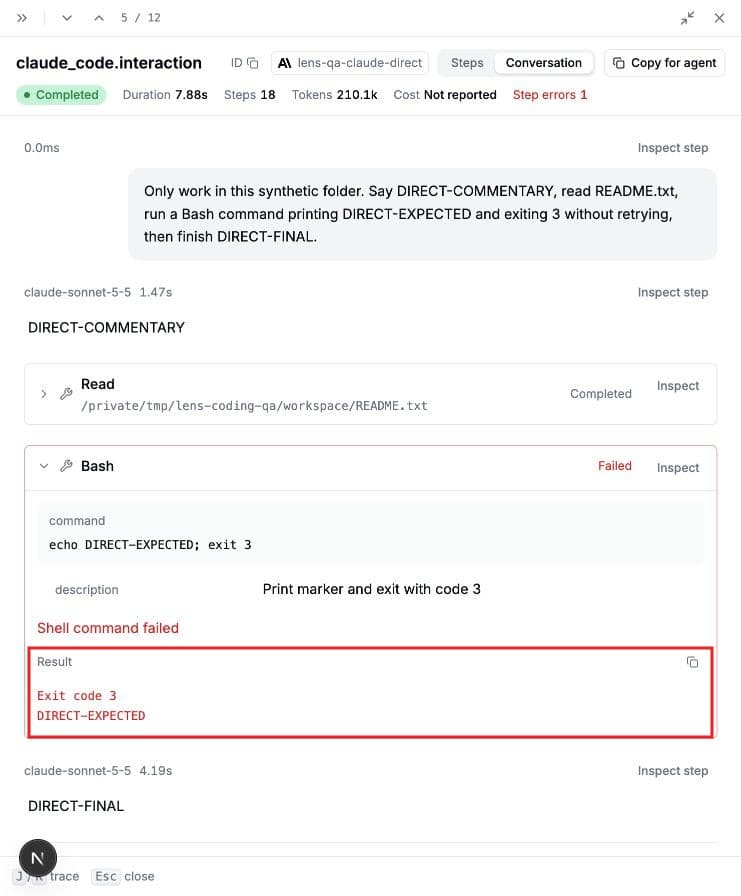
For persistent configuration, add these variables to the env object in your user-level ~/.claude/settings.json, preserving existing settings. Repository-level settings cannot enable telemetry or choose its destination. Managed settings may override your local destination.
Codex
Use the BerriAI Codex integration for local Codex desktop and CLI sessions. Automatic setup currently supports macOS and requires Python 3.11 or later and a Codex version with plugin support. Run setup on the computer where Codex runs.
Copy this prompt into your coding agent to have it install and configure the integration, or follow the manual steps below.
Set up LiteLLM Lens tracing for my local Codex desktop or CLI sessions. First read https://docs.litellm.ai/docs/proxy/lens/coding-agents.md and https://github.com/BerriAI/litellm-lens-codex-integration/blob/main/README.md.
1. Check this machine's operating system and Python version against the integration's current prerequisites. If automatic setup is unsupported, explain the limitation rather than inventing installation steps.
2. Ask me for the full Traces endpoint from Lens > Traces > Set up tracing and an agent name. The installer accepts that endpoint at its Lens ingestion URL prompt and preserves /lens-ingest when present. Use the documented Terminal setup so I can enter my dedicated tracing key at its hidden prompt and confirm recording. Never ask me to paste the key into chat, print it, or commit it.
3. Install or update the official BerriAI integration using the README's From Terminal instructions. Reuse an existing installation where possible, and preserve my Codex authentication, model configuration, and unrelated hooks. Explain what will be recorded; only newly captured activity should be exported.
4. Tell me to start a new Codex chat and complete a small prompt that uses a tool. Verify its trace appears under my chosen agent name in Lens > Traces > Conversation, with the prompt, tool outcome, and assistant reply. Check the integration's status and pending uploads if it does not appear; installation alone is not proof that capture works.
5. Show me what changed with credentials hidden, explain how to pause recording with lens-setup, and summarize the integration's capture limits.
In Terminal, install the plugin. The same plugin serves desktop and CLI:
codex plugin marketplace add BerriAI/litellm-lens-codex-integration
codex plugin add litellm-lens@berriai-lens
Start a new Codex chat and send:
Use lens-setup to connect my Codex chats to LiteLLM Lens.
In the private Terminal setup window, enter these values:
| Setup field | Local Lens value |
|---|---|
| Lens ingestion URL | http://localhost:4318/v1/traces, or the full endpoint copied from Lens |
| Lens tracing key | The dedicated tracing key, entered at the hidden prompt |
| Agent name | codex |
Confirm recording, then start another new chat so its hooks load. For a CLI check, run this from your project:
codex exec "Reply with exactly: Lens Codex telemetry check."
Open Traces in standalone Lens or Lens > Traces in LiteLLM, filter by codex, and open the chat trace in Conversation. Do not paste your tracing key into a Codex prompt or use it as your model key. The plugin handles telemetry; do not copy the Claude Code environment variables into Codex or enable a second exporter for the same recording.
CLI capture was checked with Codex 0.170.0 and plugin 0.4.0. Each chat has one trace, updated after completed or interrupted turns. Reopening a chat continues its trace. The plugin supplies the chat-level trace ID, so this grouping works on both Lens 0.1.0 and main, without lens.session.capture or lens.session.attribute. Only activity after setup is recorded.
The plugin reads visible transcript items for newly recorded turns, including commentary, repeated messages, tool outcomes, model changes, and subagents. Completed transcript turns can be recovered when a completion hook is missing. See the coverage and privacy details for its limits. To pause recording, ask Codex: Use lens-setup to pause recording.
Coverage and troubleshooting
Lens shows the content the coding agent exported. It cannot recover missing content from older traces. Claude's native telemetry does not export an exact terminal recording: images, hidden reasoning, local menus, permission dialogs, and some session events may be absent. Claude also limits exported content length; long tool results or replies can be truncated before Lens receives them. Codex replaces media with explicit omission markers and identifies unsupported transcript items. These limits prevent a promise of identical rendering for every session or future agent version.
If Claude shows tools but no replies, check OTEL_LOGS_EXPORTER, OTEL_LOG_ASSISTANT_RESPONSES, and the logs endpoint. A 404 for /v1/logs means the Lens service or ingestion route needs an update. Allow the exporters to flush after a turn. Do not enable raw API-body export to compensate for missing reply logs.
To change the Claude agent name, set gen_ai.agent.name in OTEL_RESOURCE_ATTRIBUTES. For example, gen_ai.agent.name=my-claude-code,developer=alice,lens.session.capture=true. Use that exact name in the trace filter and in any investigation's agent filter. An investigation restricted to claude-code will not sample my-claude-code automatically.
For large traces, use Load next steps in Conversation to load later activity. If a step fails to load, retry it before loading the next page. Subagent branches preserve their own messages and tool results so concurrent agents do not appear to be one speaker.